A self-healing, auto-scaling web tier with path-based routing
8 min readAWSJuly 2026
A single AWS Application Load Balancer routes traffic to three independent, self-healing Auto Scaling Groups based solely on the request path. Here's how I built it — over HTTPS on a custom domain — and the real bugs I hit along the way.
ALBPath routingTarget GroupsAuto ScalingACM (TLS)Route 53EC2User Data
Built in the AWS Console · us-east-1 · SAA exam prep
The idea
One entry point, many backends, rules deciding who gets what
Most beginner AWS projects stop at "spin up a server, install a web server, done." That doesn't show anything about how real systems handle traffic — multiple backends, health checks, failure isolation, routing logic. I wanted something small enough to build in an afternoon that actually exercises a pattern used in production everywhere: one load balancer in front, many backends behind, and Layer-7 rules routing requests purely on the URL path.
Hit /about-me and you land on one backend. Hit /what-am-i-doing and you land on a completely different one. Then I took it further: each backend sits behind its own Auto Scaling Group, so they scale and self-heal independently, and the whole thing is fronted by HTTPS on a custom domain via ACM and Route 53.
One ALB → path rules → three independent, self-healing Auto Scaling Groups.
Architecture
Three backends that fail and heal independently
Each backend runs behind its own Auto Scaling Group, across three Availability Zones. If the ASG behind /about-me loses an instance, it replaces the instance automatically and the ALB simply stops routing to the unhealthy one in the meantime — without touching the other two paths at all. That isolation is the whole point.
Three Auto Scaling Groups — one per backend — each across three AZs, desired/min/max = 1/1/3, all healthy at desired capacity.
Port 80 on the ALB does nothing but 301-redirect to 443, so clients are never served over plain HTTP. TLS terminates at the load balancer; the hop from ALB to each instance travels over port 80 inside the private network, and the instances aren't reachable from the internet directly at all — their security group only accepts traffic from the ALB's security group.
What I built
Step by step
01
A launch template per backend
Each backend gets its own EC2 Launch Template, bootstrapped by User Data on first boot — Amazon Linux 2023, Apache, and a different static page each. No manual SSH-and-configure step, so the whole environment is reproducible from a script.
02
Three target groups
One target group per backend, each health-checked independently by the ALB. This independent health check is what lets one backend fail without affecting the others.
03
Three Auto Scaling Groups — one per target group
Deliberately not one shared ASG. Each ASG is wired to exactly one target group and one launch template, with --health-check-type ELB so it trusts the ALB's view of health — not just "is the OS running" — when deciding whether to replace an instance. Each spans 3 AZs (min 1 / desired 1 / max 3) and scales on target-tracking against average CPU (60%).
04
One load balancer, two listeners
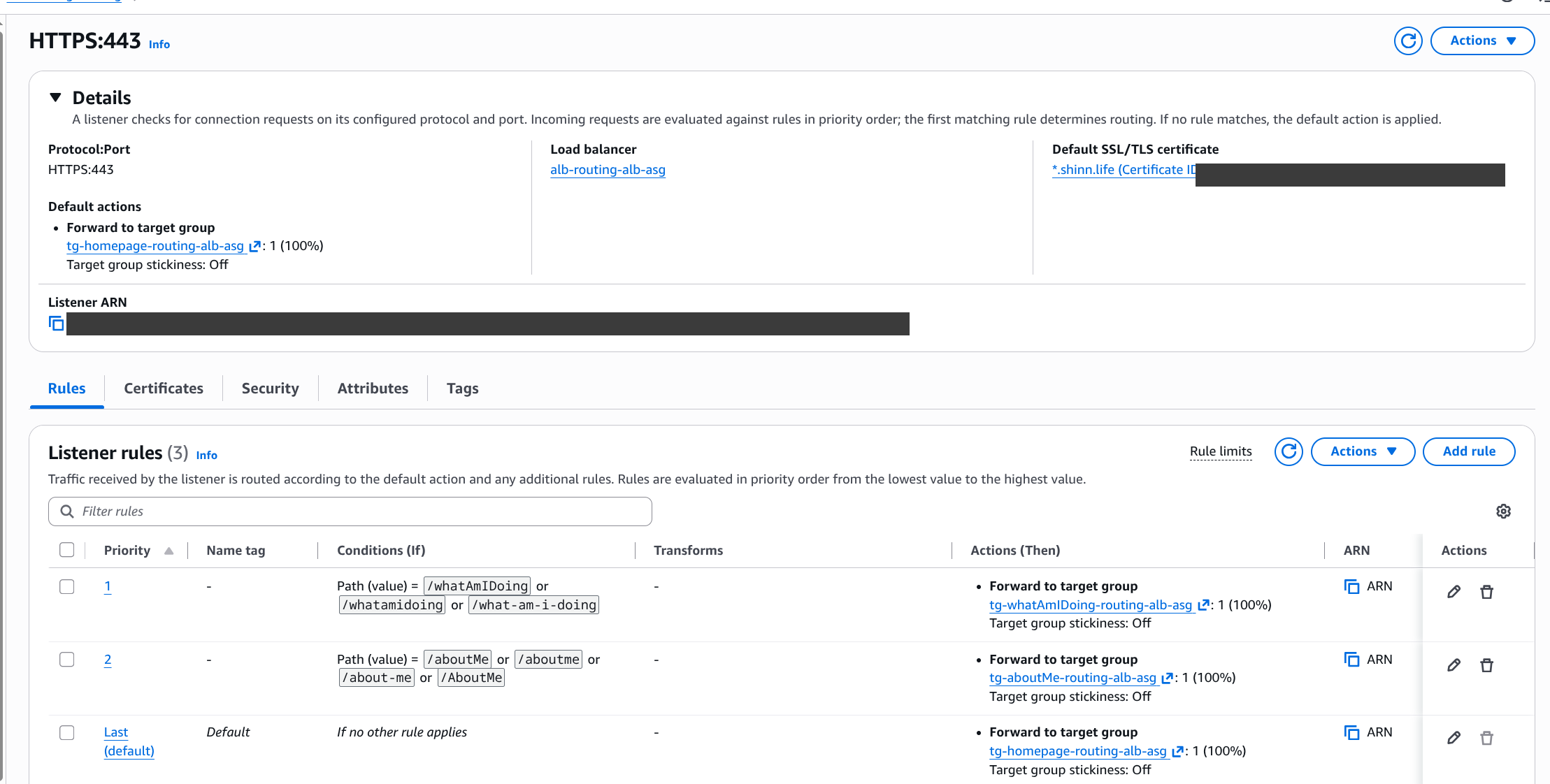
An HTTPS listener on :443 carrying the ACM certificate and the routing rules, plus an HTTP listener on :80 that does nothing but redirect to 443.
05
Two path rules, evaluated by priority
Priority 1 → /whatAmIDoing, /whatamidoing, /what-am-i-doing. Priority 2 → /aboutMe, /aboutme, /about-me, /AboutMe. Default → the homepage target group. The ALB evaluates from lowest number up and stops at the first match.
The routing logic lives entirely in these listener rules — no backend needs to know or care what path sent it traffic. (ARNs, cert ID and account ID redacted.)
Gotcha: ALB path-pattern matching is case-sensitive, so I listed each accepted spelling explicitly (/aboutMe, /aboutme, /about-me, /AboutMe) rather than relying on one value. I also used exact paths, not a trailing wildcard — the trade-off is that sub-paths like /about-me/x fall through to the default, which is fine here since there are none.
Three launch templates (one per backend), each on version 2 — every instance self-bootstraps via User Data. (Template IDs and account ID redacted.)
Encryption
HTTPS on my own domain, and where TLS actually stops
Once routing worked over plain HTTP on the ALB's default DNS name, I layered on a real domain and a certificate: a wildcard *.shinn.life cert in ACM, DNS-validated through Route 53, attached to the HTTPS:443 listener; the HTTP:80 listener switched to a 301 redirect; and a Route 53 alias record pointing routingalb.shinn.life at the ALB.
The wildcard certificate — Issued and In use — auto-renewed by ACM with no running infrastructure to manage.
Why TLS terminates at the load balancer
Worth being precise, because it's a common point of confusion. TLS is terminated at the ALB — the browser-to-ALB hop is encrypted, but the ALB then forwards to the instances over plain HTTP:80 inside the VPC. That last hop isn't encrypted, and that's a deliberate, standard choice — not an oversight:
The risky leg is encrypted
The public-internet hop — where the real eavesdropping risk lives — is encrypted. The ALB-to-instance hop stays on the private network.
Backends are locked down
Instances only accept traffic from the ALB's security group, so nothing on the internet can reach them directly anyway.
No certs on the backends
The ALB does all the TLS work and ACM renews the cert automatically — the backends never touch a certificate.
When you'd re-encrypt: the step up is end-to-end TLS — set the target group to HTTPS:443, open 443 on the instance SG from the ALB, and run a (self-signed is fine) cert on each backend. You'd reach for that in regulated environments — PCI, HIPAA — where even traffic inside the VPC must be encrypted. For this project, terminating at the ALB is the right call; the point is knowing the difference and choosing deliberately.
The proof
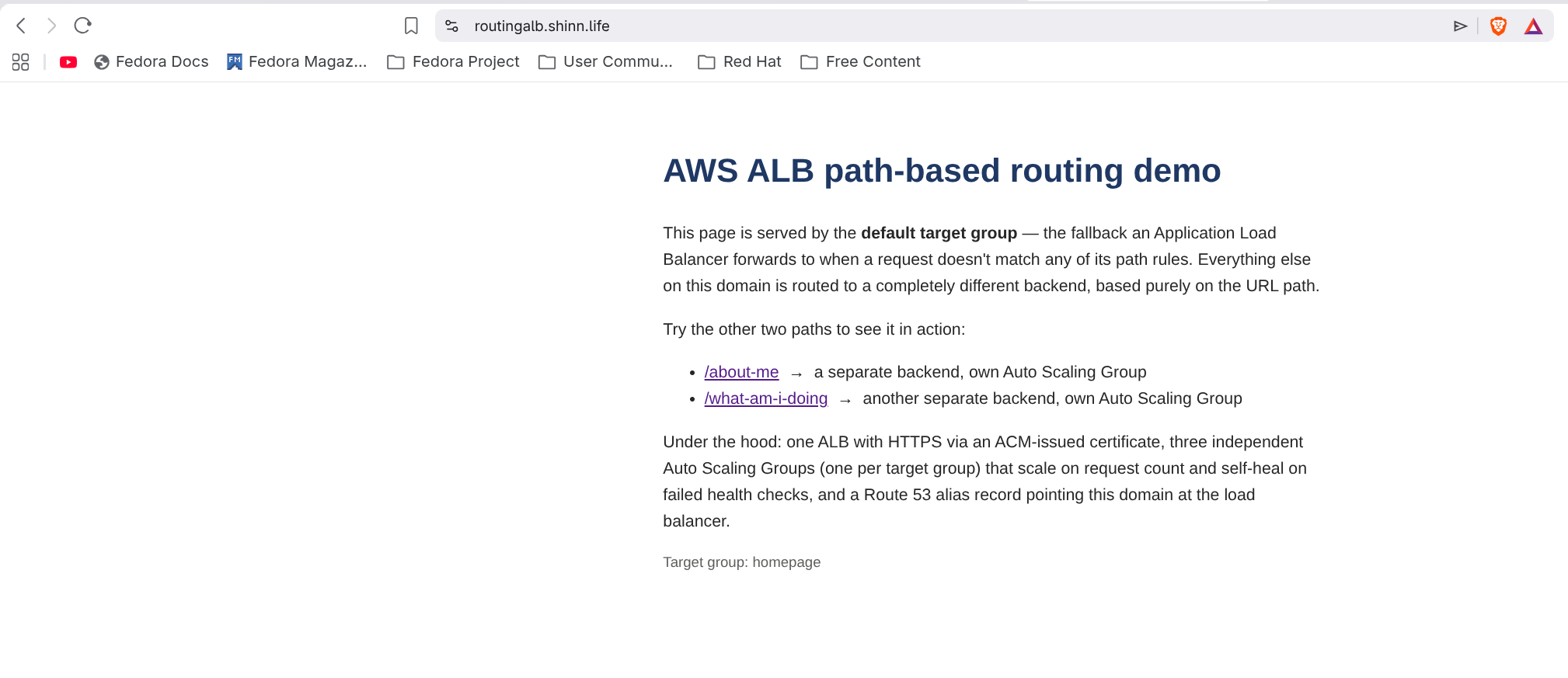
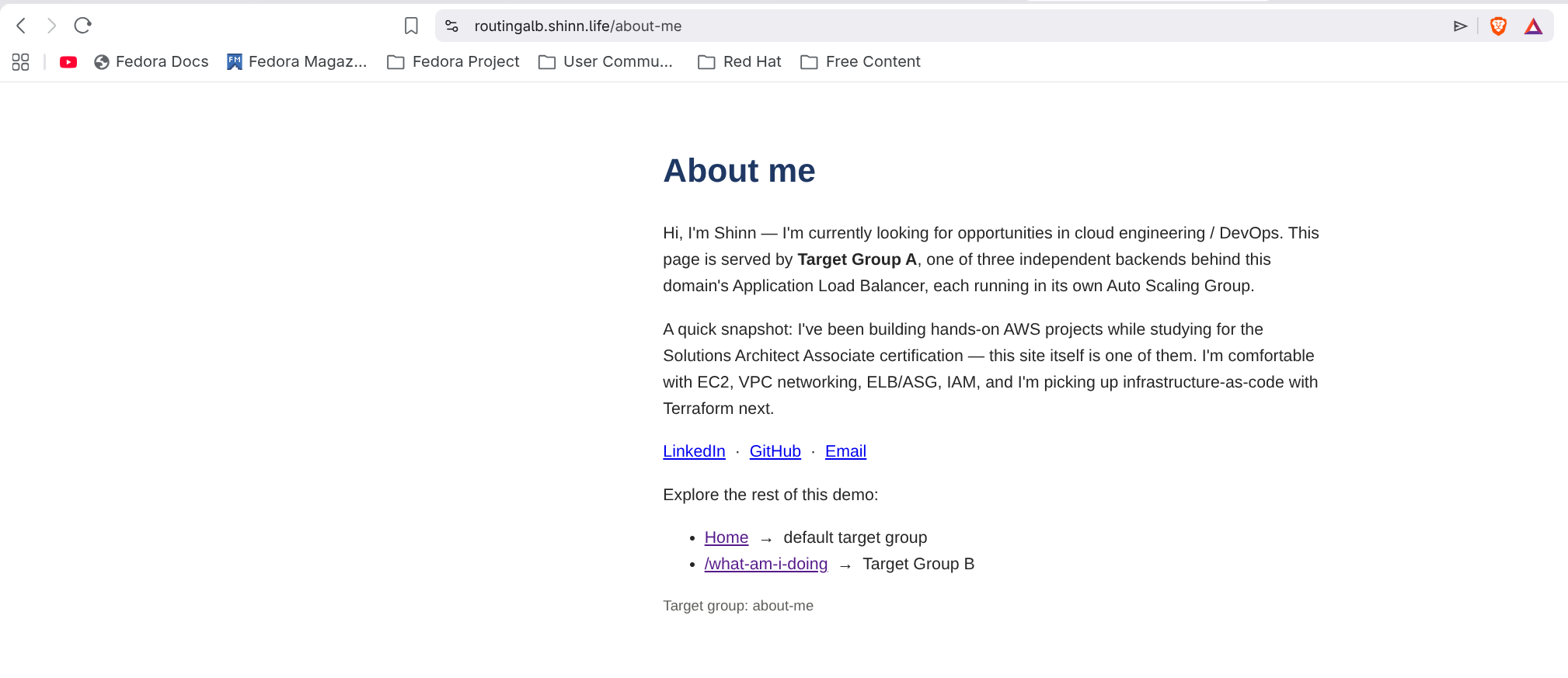
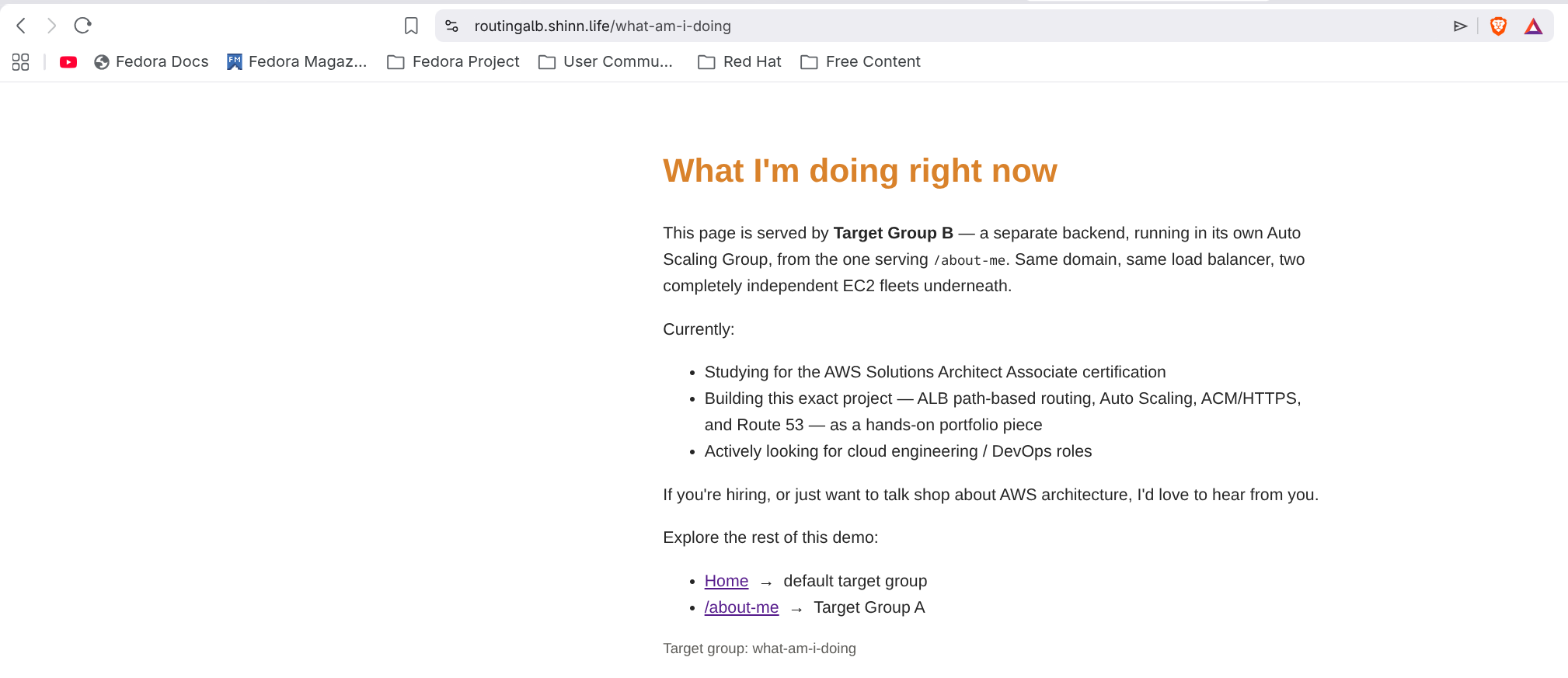
Three paths, three backends, one domain
Same load balancer, same certificate — the URL path alone decides which backend answers.
/ → homepage TG/about-me → TG A/what-am-i-doing → TG B
Note: this environment is torn down after publishing to avoid ongoing AWS cost — the ASGs, target groups, load balancer and Route 53 record are deleted; only the (free) ACM certificate is kept. The screenshots above are the permanent record of it running.
The journey
The bugs I actually hit (and how I found them)
More useful to write down than the happy path — these are the mistakes that actually cost time, and the reasoning that got me out of each one.
"the AMI has my User Data baked in, right?"
User Data isn't stored in the AMI
My first instinct was to bake a custom AMI and assume its setup script would re-run on every launch. It doesn't — User Data is supplied per Launch Template, at launch time, and is never stored in the image. The AMI is just the disk; User Data is a separate instruction set attached fresh to each launch. Fix: keep User Data in the Launch Template, not the image.
one ASG, three target groups — seemed efficient
A shared ASG silently breaks the demo
I tried attaching a single ASG to all three target groups to "save resources." An ASG attached to multiple target groups registers every instance it launches into all of them — so every instance would have to serve all three pages. Fix: one ASG per target group, each with its own launch template and content.
404 Not Found on every path except /
The ALB forwards the raw path unchanged
Routing was correct (confirmed in the target group's request logs), so the bug was downstream. A request for /about-me really does arrive at the instance as /about-me — and Apache only had a file at index.html, so it correctly 404'd on everything else. Fix: a mod_rewrite fallback serving index.html for any path that isn't a real file, baked into every instance's User Data:
/etc/httpd/conf.d — the mod_rewrite fallback
<Directory"/var/www/html">RewriteEngine On
RewriteCond %{REQUEST_FILENAME} !-fRewriteRule ^ /index.html [L]
</Directory>
Connection refused
"Connection refused" vs a timeout — two different root causes
After pointing Route 53 at the ALB, curl on the custom domain returned Connection refused on every resolved IP. The useful clue was how fast it failed — under 300ms, not a multi-second hang. A slow timeout would mean a security group silently dropping packets; a fast, active refusal means something is actively saying "nothing's listening here."
the tell: instant refusal, not a hang
$ curl -v https://routingalb.shinn.life
* connect to 52.220.x.x port 443 failed: Connection refused# check what listeners actually exist$ aws elbv2 describe-listeners --load-balancer-arn ...Port: 80# ...only HTTP:80 existed — I never created the HTTPS:443 listener
Everything up to that point had only been tested over plain HTTP on the ALB's raw DNS name. Creating the HTTPS:443 listener with the ACM cert attached fixed it immediately.
The result
What I ended up with
What I'd highlight to someone reviewing this
✓Path-based routing is a Layer-7 capability. It's one of the things that separates an Application Load Balancer (L7) from a Network Load Balancer (L4).
✓Each backend fails and heals independently — one ASG per target group, deliberately, not a shared one.
✓Routing logic lives in infrastructure, not app code. No backend needed to know or care what path routed to it.
✓TLS terminates at the ALB, on my own domain, with a cert ACM renews automatically — and the ALB is the sole public entry point.
✓Debugging means distinguishing failure modes. A fast "connection refused" versus a slow timeout point at completely different root causes — and telling them apart saved real time.
Next iteration
What I'd improve next
This build is deliberately console-driven and static — a focused way to learn the routing and scaling primitives before adding complexity on top of them. If I took it further, here's where it would go:
✓Manage it all with Terraform — capture every resource as code instead of clicking through the console, so the whole stack is reproducible, reviewable, and safe to tear down and rebuild without guessing what I clicked last time.
✓Move from static pages to containers — run real containerised apps behind the same ALB, keeping the routing and scaling model intact while the workload itself becomes something closer to production.
✓Deploy through a CI/CD pipeline — ship changes automatically on every push instead of manually baking static pages into User Data, closing the loop between writing code and seeing it live.
Want to see more of my work?
I build hands-on projects across AWS, Linux, Docker and CI/CD — learning by shipping real environments.